
Ansible is a suite of software tools that enables infrastructure as code. It is open-source and the suite includes software provisioning, configuration management, and application deployment functionality.
In this lab we will use it to configure an existing server.
Install
We can install ansible via a Linux package manager or via python.
Install it for your current user on your machine or admin virtual machine. Not on the server to be configured!
sudo apt update
sudo apt install pipx
pipx ensurepath
pipx install --include-deps ansible
If you use WSL2 you can copy your ssh keys from within the WSL2 Ubuntu shell:
cp -r /mnt/c/Users/<username>/.ssh ~/.ssh
chmod 600 ~/.ssh/id_rsa
Create the project structure shown below. The inventory folder will contain all information to locate nodes which we will configure. The templates and files folder will contain files which need to be copied onto the remote nodes.
Directory structure for our first project
first_ansible_project
├── first_playbook.yaml
├── inventory
│   └── hosts
├── files
│   └── nginx.conf
└── templates
    └── index.html.j2
Setup Inventory
First we have to tell ansible how to access our remote server.
Inside the inventory directory create a hosts file.
inventory/hosts
[webservers]
web1 ansible_host=w.x.y.z ansible_user=debian
Host can be defined in ini format or yaml. Above we have chosen ini format. An entry can be as simple as a domain name to get to the right ip. Or as we have done, be a name associated with an ip and additional options. Here we inform ansible to use debian user as for attempting the connection in case our local username is different. Additionally our web1 is in the webservers group. Host can be referenced in ansible by name, groupname or all.
Test Connection
Test that the connection works by executing the following command
ansible -i inventory all -m ping
This will try to execute module ping on all hosts defined in the inventory.
First Play
Create the playbook
first.yaml
- name: Configure webserver with nginx
  hosts: web1
  become: true
  tasks:
    - name: Ensure nginx is installed
      ansible.builtin.package:
        name:
          - nginx
        state: present
        update_cache: true
This will execute one task with the package module to ensure that nginx is installed on the remote server. become: true (using sudo for commands) at the playbook level will get applied to all tasks.
Run the playbook
ansible-playbook -i inventory first.yaml
Test if nginx is available on the server's public ip.
Customize Nginx
Prepare two files which will be copied onto the server to have our custom html page.
First we will replace the default nginx configuration with our own.
files/nginx.conf
server {
        listen 80 default_server;
        listen [::]:80 default_server ipv6only=on;

        root /usr/share/nginx/html;
        index index.html index.htm;

        server_name localhost;

        location / {
                try_files $uri $uri/ =404;
        }
}
We will also create our own index.html file, but we want to adapt it automatically to the servers to which it is copied to. Ansible uses the jinja2 template engine as does Flask. This allows us to inject variables into text files. Here we will use the inventory_hostname as defined in our hosts file.
templates/index.html.j2
<html>
  <head>
    <title>Welcome to ansible</title>
  </head>
  <body>
  <h1>Nginx, configured by Ansible</h1>
  <p>If you can see this, Ansible successfully installed nginx.</p>

  <p>Running on {{ inventory_hostname }}</p>
  </body>
</html>
Adapt the play book to copy these files and restart nginx.
first.yaml
- name: Configure webserver with nginx
  hosts: web1
  become: true
  tasks:
    - name: Ensure nginx is installed
      ansible.builtin.package:
        name:
          - nginx
        state: present
        update_cache: true
    - name: Copy nginx config file
      ansible.builtin.copy:
        src: nginx.conf
        dest: /etc/nginx/sites-available/default
        owner: www-data
        group: www-data
        mode: 0644
    - name: Ensure default site is enabled
      ansible.builtin.file:
        src: /etc/nginx/sites-available/default
        dest: /etc/nginx/sites-enabled/default
        state: link
    - name: Copy home page template
      ansible.builtin.template:
        src: index.html.j2
        dest: /usr/share/nginx/html/index.html
    - name: Restart nginx
      ansible.builtin.service:
        name: nginx
        state: restarted
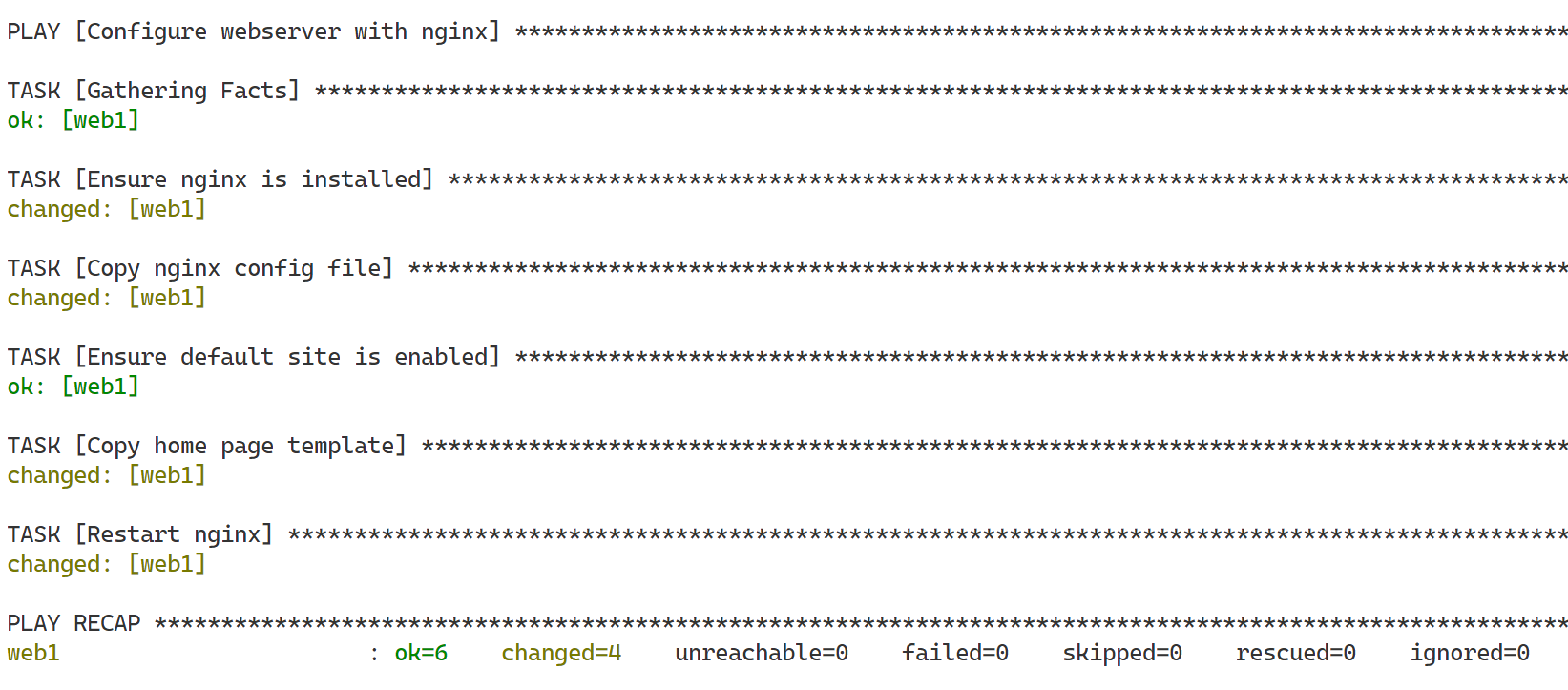
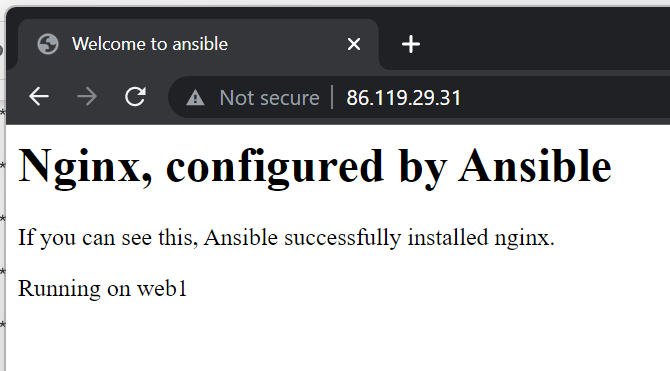
Run this new version and look at the homepage
Run the playbook a second time
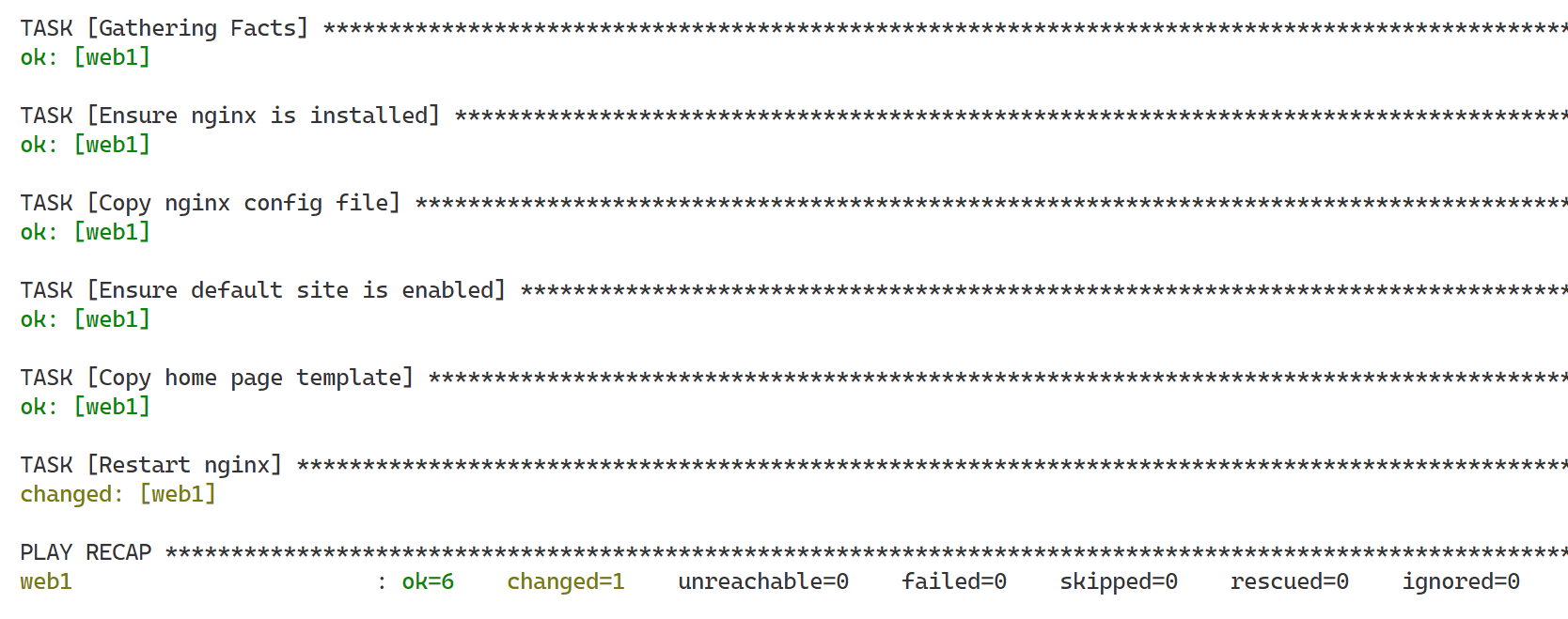
You will see that only restart is executed again, all the other task are not applied as they already are in the correct state. This is Ansible's Idempotency in action (An operation is idempotent if the result of performing it once is exactly the same as the result of performing it repeatedly without any intervening actions).
Adapt the configuration to only restart nginx when necessary
By adding the restart task to a new handlers section instead of tasks and using the notify attribute whenever we required the restart to be triggered if a change occurred. We can make the restart depend on the execution of another task.
first.yaml
- name: Configure webserver with nginx
  hosts: web1
  become: true
  tasks:
    ...
    - name: Ensure default site is enabled
      ansible.builtin.file:
        src: /etc/nginx/sites-available/default
        dest: /etc/nginx/sites-enabled/default
        state: link
      notify: Restart nginx
    - name: Copy home page template
      ansible.builtin.template:
        src: index.html.j2
        dest: /usr/share/nginx/html/index.html

  handlers:
    - name: Restart nginx
      ansible.builtin.service:
        name: nginx
        state: restarted
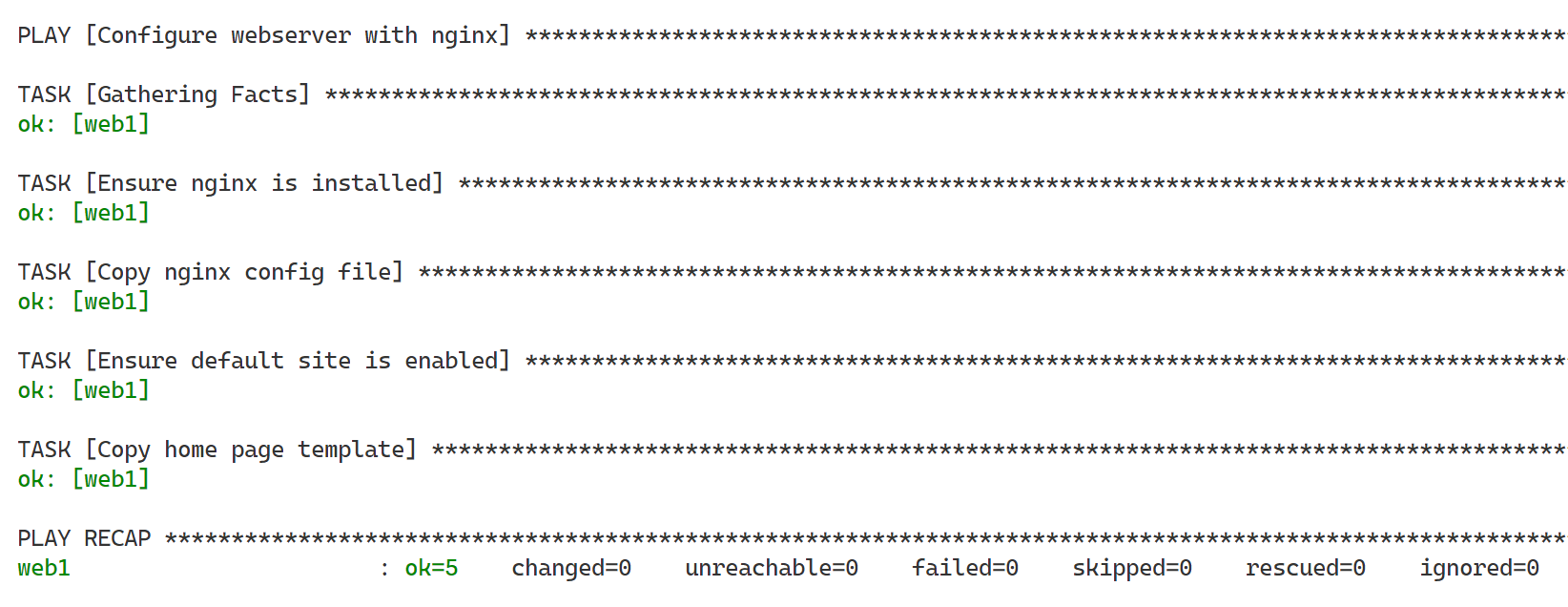
Run to test if nginx restarted is trigger or not
We previously deployed a production ready guestbook app with SSL by hand. This time we will create an ansible playbook which does everything for us.
The app is 03_nginx_gunicorn_certbot, which we will clone from github and then run in a python virtual environment via gunicorn. Static files are served by nginx the other request are proxied to gunicorn.
Create a new nginx template file
We will configure nginx to serve files and proxy the rest. As the domain name might change we will use a template with a variable (service_host) instead of hardcoding it into the file. The project folder (project_dir) is also a variable.
templates/http.conf.j2
upstream backend {
    server 127.0.0.1:8000;
}

server {
  listen 80;
  server_name {{ service_host }};
  root /usr/share/nginx/html;
  index index.html;

  location / {
    proxy_pass http://backend;
  }

  location /static {
    alias {{ project_dir }}/03_nginx_gunicorn_certbot/static;
  }

}
Create a service template file
We define the service template file with project directory
templates/gunicorn-gb.service.j2
[Unit]
Description=gunicorn instance to serve Flask app
After=network.target

[Service]
User=www-data
Group=www-data
WorkingDirectory={{ project_dir }}/03_nginx_gunicorn_certbot/
Environment="PATH={{ project_dir }}/03_nginx_gunicorn_certbot/env/bin"
ExecStart={{ project_dir }}/03_nginx_gunicorn_certbot/env/bin/gunicorn --workers 1 --threads 8 --bind 127.0.0.1:8000 app:app

[Install]
WantedBy=multi-user.target
New playbook
In this playbook we will define and use our own variables. Adapt them to your project!
We also prompt for the duckdns token to ensure that it is not saved in a file.
guestbook.yaml
- name: Configure guestbook app
  hosts: web1
  become: true
  vars:
    project_dir: /usr/share/guestbook
    service_host: "gb-heg.duckdns.org"
    service_admin_email: "boris.fritscher@he-arc.ch"
  vars_prompt:
    - name: duckdns_token
      prompt: Enter duckdns token
      private: true
  tasks:
    - name: Ensure dependencies are installed
      ansible.builtin.package:
        name:
          - nginx
          - git
          - python3
          - python3-pip
          - python3-venv
          - certbot
          - python3-certbot-nginx
        state: present
        update_cache: true
    - name: Ensure destination does not exist
      ansible.builtin.file:
        path: "{{ project_dir }}"
        state: absent
    - name: Clone project from github
      ansible.builtin.git:
        repo: 'https://github.com/bfritscher/guestbook-src.git'
        depth: 1
        single_branch: true
        dest: "{{ project_dir }}"
    - name: Change ownership
      ansible.builtin.file:
        path: "{{ project_dir }}"
        owner: "www-data"
        group: "www-data"
        state: directory
        recurse: true
    - name: Copy nginx config file
      ansible.builtin.template:
        src: templates/http.conf.j2
        dest: /etc/nginx/sites-available/default
        owner: www-data
        group: www-data
        mode: 0644
    - name: Ensure default site is enabled
      ansible.builtin.file:
        src: /etc/nginx/sites-available/default
        dest: /etc/nginx/sites-enabled/default
        state: link
      notify: Restart nginx
    - name: Update DuckDNS via api
      ansible.builtin.uri:
        url: "https://www.duckdns.org/update?domains={{ service_host }}&token={{ duckdns_token }}&ip={{ hostvars['web1']['ansible_host'] }}"
        return_content: true
      register: this
      failed_when: "'OK' not in this.content"
    - name: Generate certificate
      ansible.builtin.shell: certbot --nginx -d {{ service_host }} -n -m {{service_admin_email}} --agree-tos --redirect
    - name: Install specified python requirements in indicated (virtualenv)
      ansible.builtin.pip:
        requirements: "{{ project_dir }}/03_nginx_gunicorn_certbot/requirements.txt"
        virtualenv: "{{ project_dir }}/03_nginx_gunicorn_certbot/env"
        virtualenv_command: /usr/bin/python3 -m venv
    - name: Add service
      ansible.builtin.template:
        src: templates/gunicorn-gb.service.j2
        dest: /etc/systemd/system/gunicorn-gb.service
    - name: Register service
      ansible.builtin.systemd:
        name: gunicorn-gb
        enabled: true
        daemon_reload: true
        state: restarted

  handlers:
    - name: Restart nginx
      ansible.builtin.service:
        name: nginx
        state: restarted
To know what parameters and tasks are available it is necessary to search in the Ansible Documentation!
However here some details about some of the above tasks.
Git
As we are only interested in the latest version of our files on the main branch. By specifying depth and single branch the clone will be much faster. These are git options exposed by the module.
Facts variables
On the update duckdns url task we use hostvars['web1']['ansible_host'] to get the hosts external ip from the hosts facts database. To get all available variables you can check for a specific host with:
ansible-inventory -i inventory --host web1
Task return
On the update duckdns url task we used a return in order to evaluate the result of the request to determine if the task should be marked as successful or not. Any task can return or register a result, which then can be displayed by a debug task.
Shell tasks
In the current configuration the shell task which runs certbot will always run. A better version would check if certbot needs to be run to be compatible with the Ansible's Idempotency concept. This can be achieved with conditionals.
Systemd
Ansible often has generic and specific modules. Generic modules are preferred if possible because they work on multiple linux distribution for example for packages:
- ansible.builtin.package module – Generic OS package manager
- ansible.builtin.apt module – Manages apt-packages
Or for services:
- ansible.builtin.service module – Manage services
- ansible.builtin.systemd module – Manage systemd units
In our case we needed to be able to specify daemon_reload to be sure that changes are detected and integrated by systemd.
Run playbook
ansible-playbook -i inventory guestbook.yaml
You should be able to go to your duckdns domain with https and see the guestbook running!
Task Progress Check
Take a screenshot of the guestbook with the SSL url and the command line with the output from Ansible.