Objectif: You will extend a sample application to enable the connection between frontend and backend, while focusing on security and performance.
First you will setup the environment. Then we will get into the different topics.
You must commit and push your code into your repository created with the following classroom link:
The project has a frontend and a backend folder you will start with the backend.
Install python3
You need to do the initial configuration as described below :
cd django-advanced-exercises-xyz  # to your cloned repository
cd backend

# Create a virtual environment to isolate package dependencies locally
# for windows cmd
python -m venv env
env\Scripts\activate.bat
# or for windows powershell
env\Scripts\Activate.ps1

# for linux / macos
python3 -m venv env
source env/bin/activate

# Install the project dependency
pip install -r requirements.txt
Synchronize your database :
python manage.py migrate
In order to have development data without having to create it manually on each computer, this project comes with fixture data. Learn more at https://docs.djangoproject.com/en/6.0/topics/db/fixtures/
Inside the backend folder load fixtures with:
python manage.py loaddata data
This will load the shop/fixtures/data.json into the database
Check that everything works by running the server and opening the address in the browser. http://127.0.0.1:8000/admin
python manage.py runserver
Look at the models and their relationships. What are they?
Solution: Here are the models and their relationships: User <-> Order <-> OrderLine <-> Product
By default, Django Admin is already useful, but with a few configurations in the admin.py file, we can make it much more usable. See https://docs.djangoproject.com/en/6.0/ref/contrib/admin/
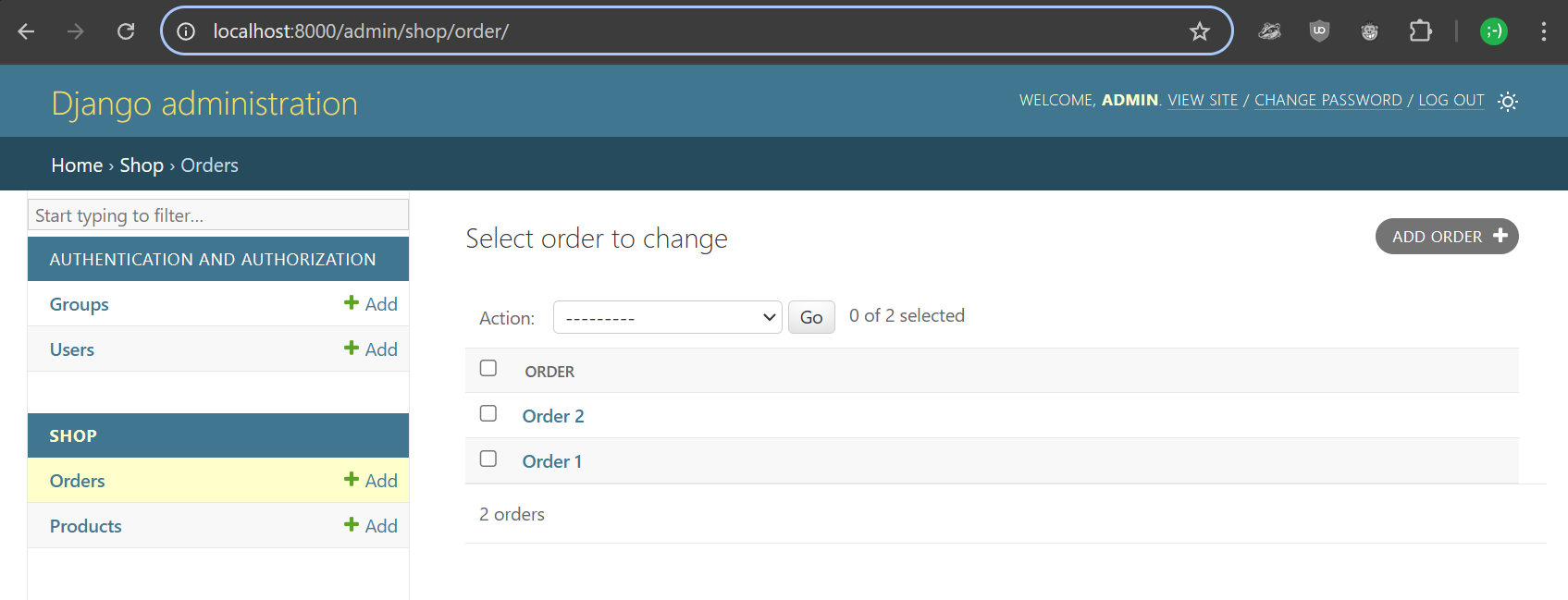
This Orders list is the default view with only one column and no filtering or search.
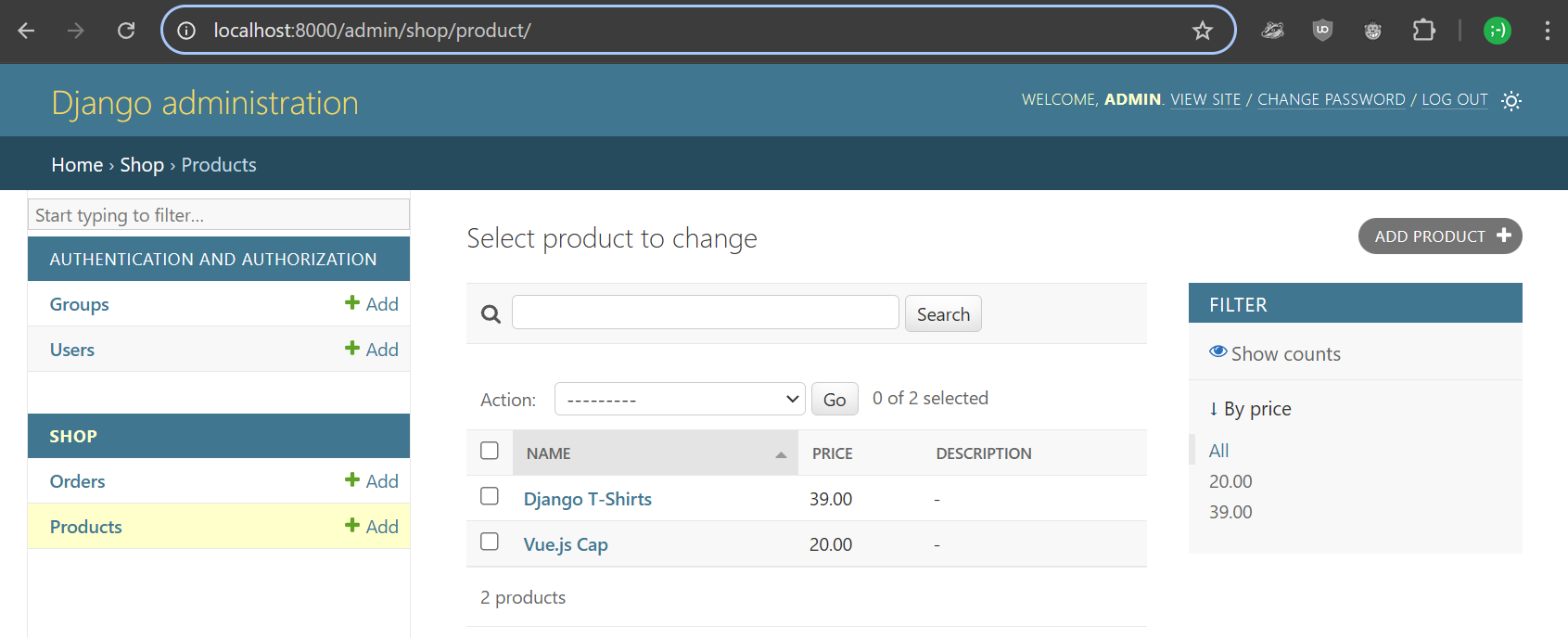
You can look at the code of ProductAdmin and see that filters, search, and columns can be added with a simple configuration of some class variables: list_display, list_filter, search_fields
The detailed view can also be modified with autocomplete fields, fieldsets, and many more settings.
We don't need to have a separate OrderLine admin but would like to see all OrderLines of a specific order. This can be achieved with a master-detail view in Django Admin; it can be created with an InlineModel:
https://docs.djangoproject.com/en/6.0/ref/contrib/admin/#django.contrib.admin.InlineModelAdmin
And if we want to display custom additional list display columns, it can be done with a method.
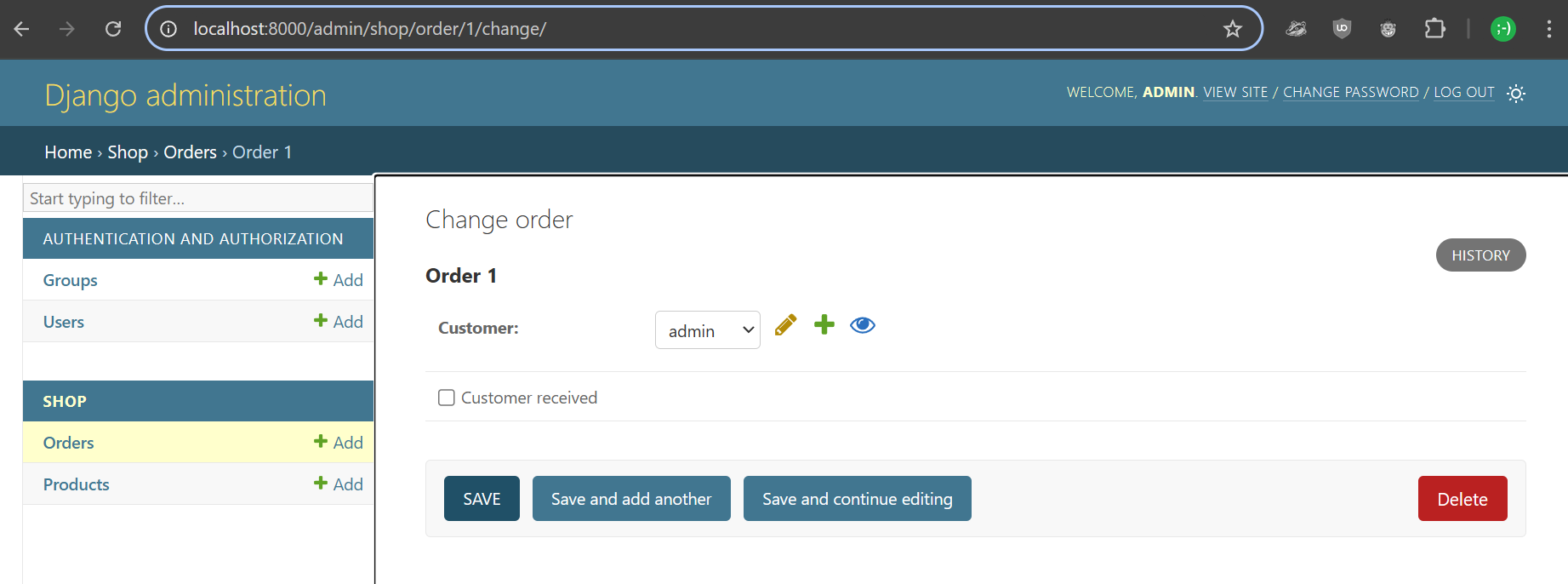
We can change it from the current view:
To something more useful:
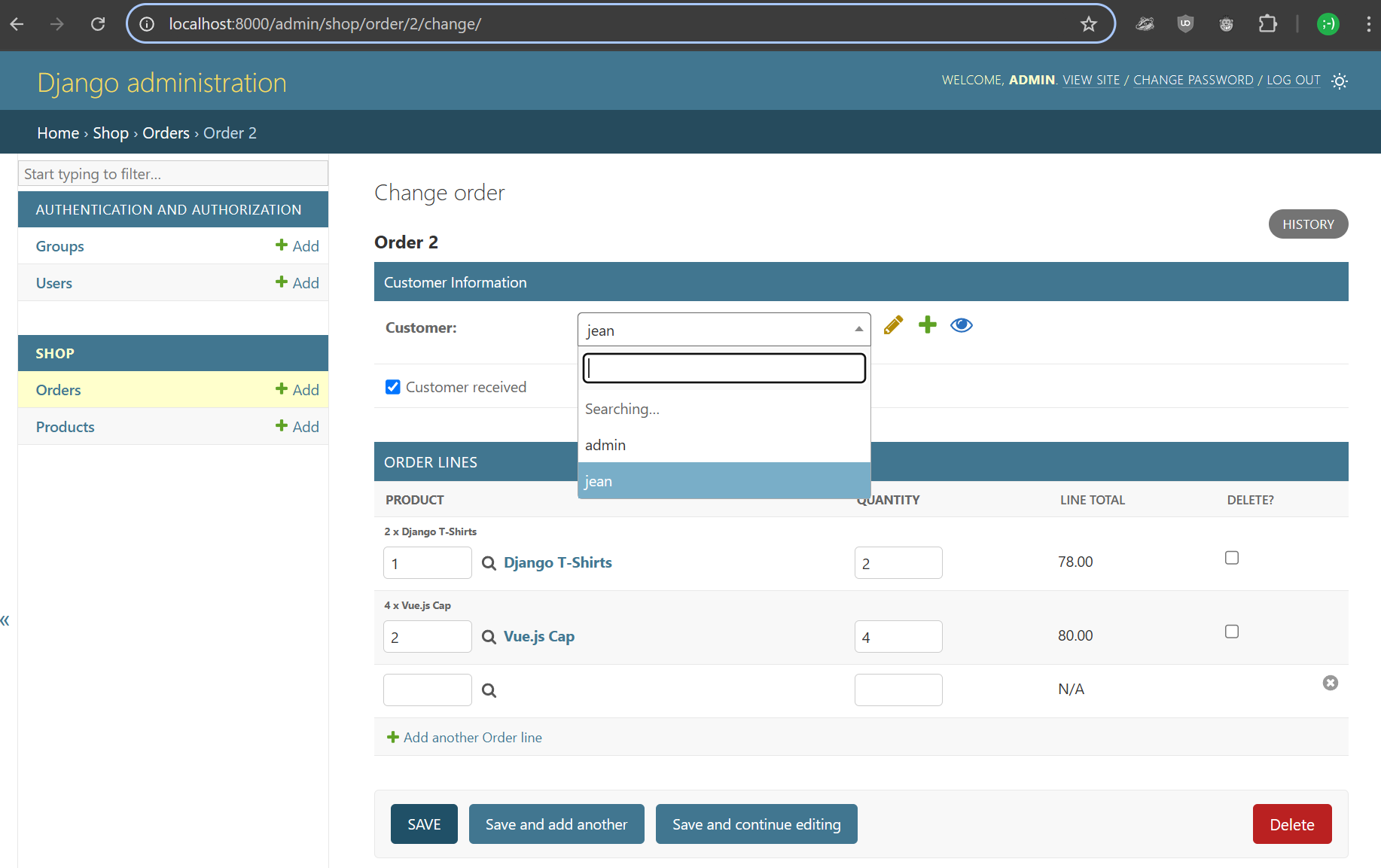
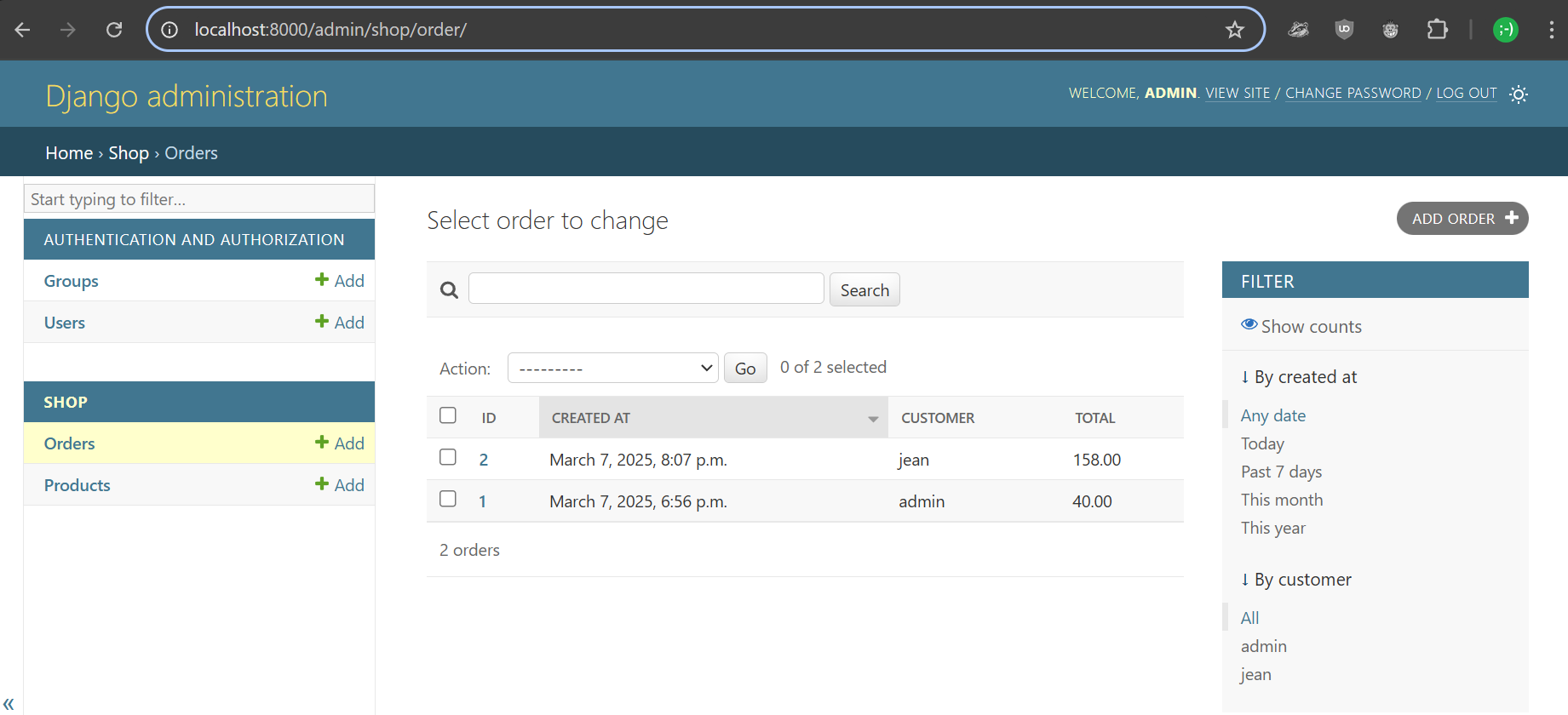
Can you arrive at these results?
In the shop/admin.py file:
Add the following class
class OrderLineInline(admin.TabularInline):
    model = models.OrderLine
    extra = 1
    raw_id_fields = ('product',)
    readonly_fields = ('line_total',)

    def line_total(self, obj):
        return obj.total if obj.id else "N/A"
    line_total.short_description = "Line Total"
And replace the current OrderAdmin
class OrderAdmin(admin.ModelAdmin):
    list_display = ('id', 'created_at', 'customer', 'display_total')
    inlines = [OrderLineInline]
    autocomplete_fields = ['customer']
    search_fields = ['customer__username', 'customer__email', 'customer__first_name', 'customer__last_name']
    list_filter = ('created_at', 'customer')

    fieldsets = (
        ('Customer Information', {
            'fields': ('customer', 'customer_received')
        }),
    )

    def display_total(self, obj):
        return obj.total
display_total.short_description = "Total"Sometimes, we do not want to make a REST query for the orders and then, for each order, perform a query for each OrderLine, and then look up each product by its ID.
We can nest relationship in the serializers: https://www.django-rest-framework.org/api-guide/relations/#nested-relationships
And we can add or customize fields which are not on the model: https://www.django-rest-framework.org/api-guide/fields/#serializermethodfield
This has already be done for OrderlineSerializer
We want to you to do it for the OrderSerializer
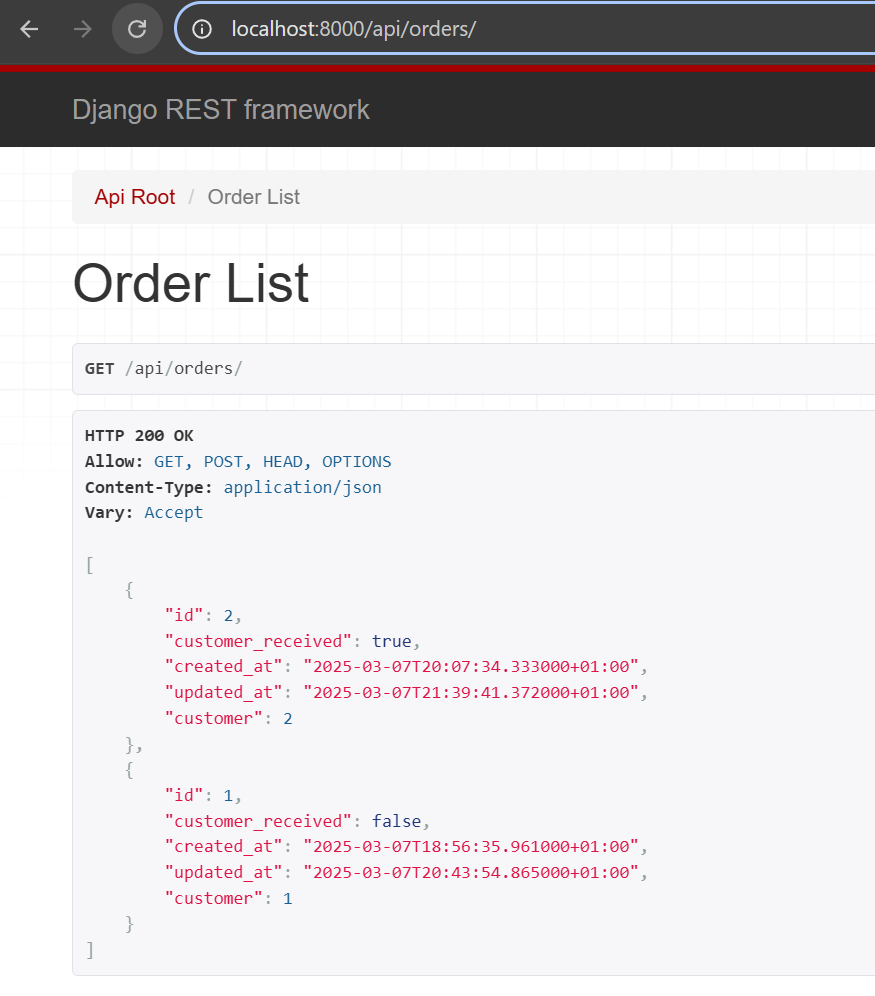
Adapt OrderSerializer to produce the following result:
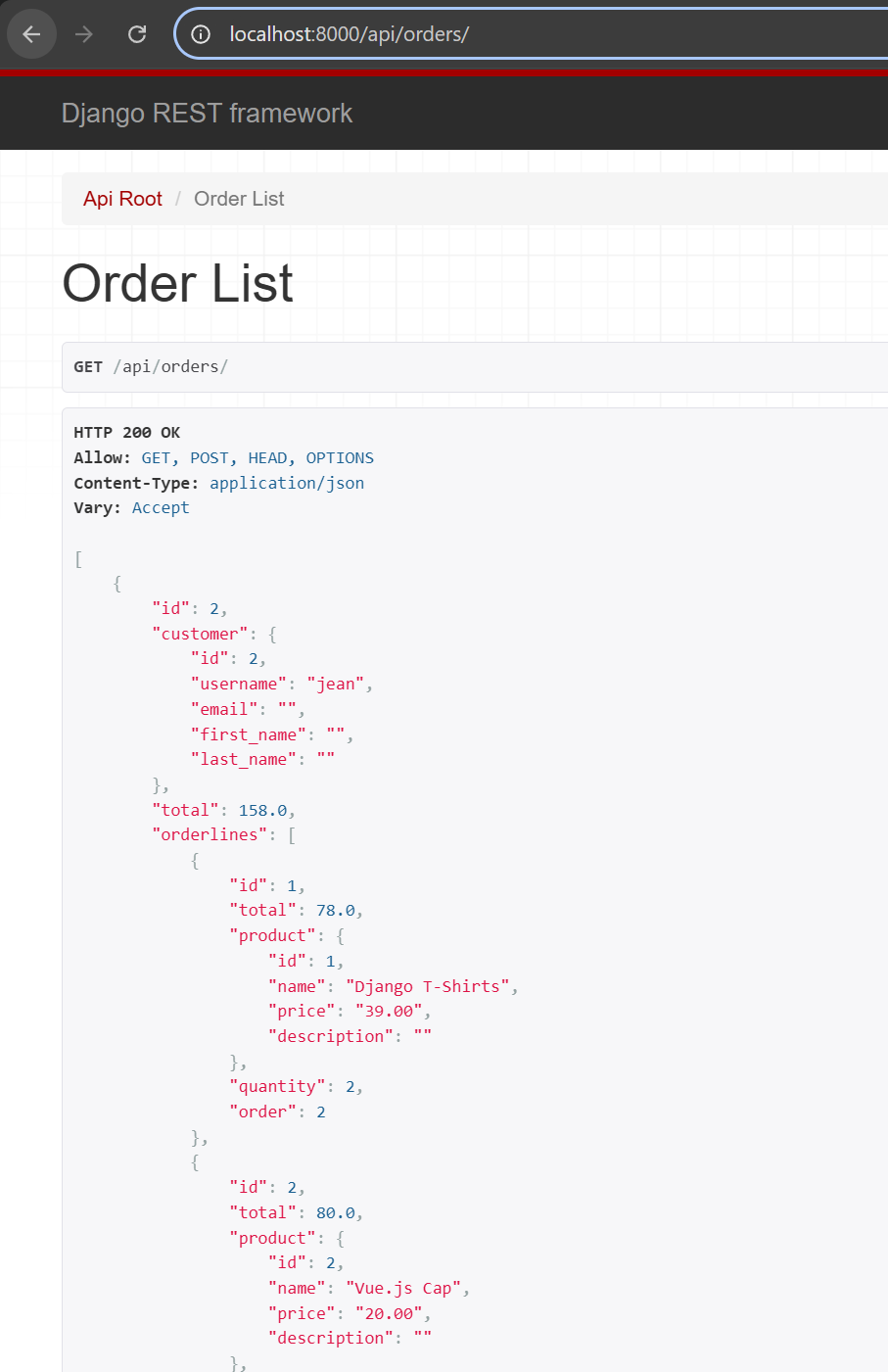
class OrderSerializer(serializers.ModelSerializer):
    customer = CustomerSerializer(read_only=True)
    total = serializers.SerializerMethodField()
    orderlines = OrderLineSerializer(many=True, read_only=True)

    class Meta:
        model = models.Order
        fields = "__all__"

    def get_total(self, obj):
        return obj.total
First setup the frontend
The frontend is a simple Vue.js application, which can display Orders.
- It uses components to show Orders and OrderLines.
- API calls are made with axios. For illustration purposes, we use async/await syntax in
App.vueand Promise syntaxe inOrderEntry.vue.
In a second terminal go to the frontend folder, install dependencies and run a server:
npm install
npm run dev
With both servers running, we see an error on the frontend. Upon further inspection in the DevTools network tab, we see that the problem is a CORS error.
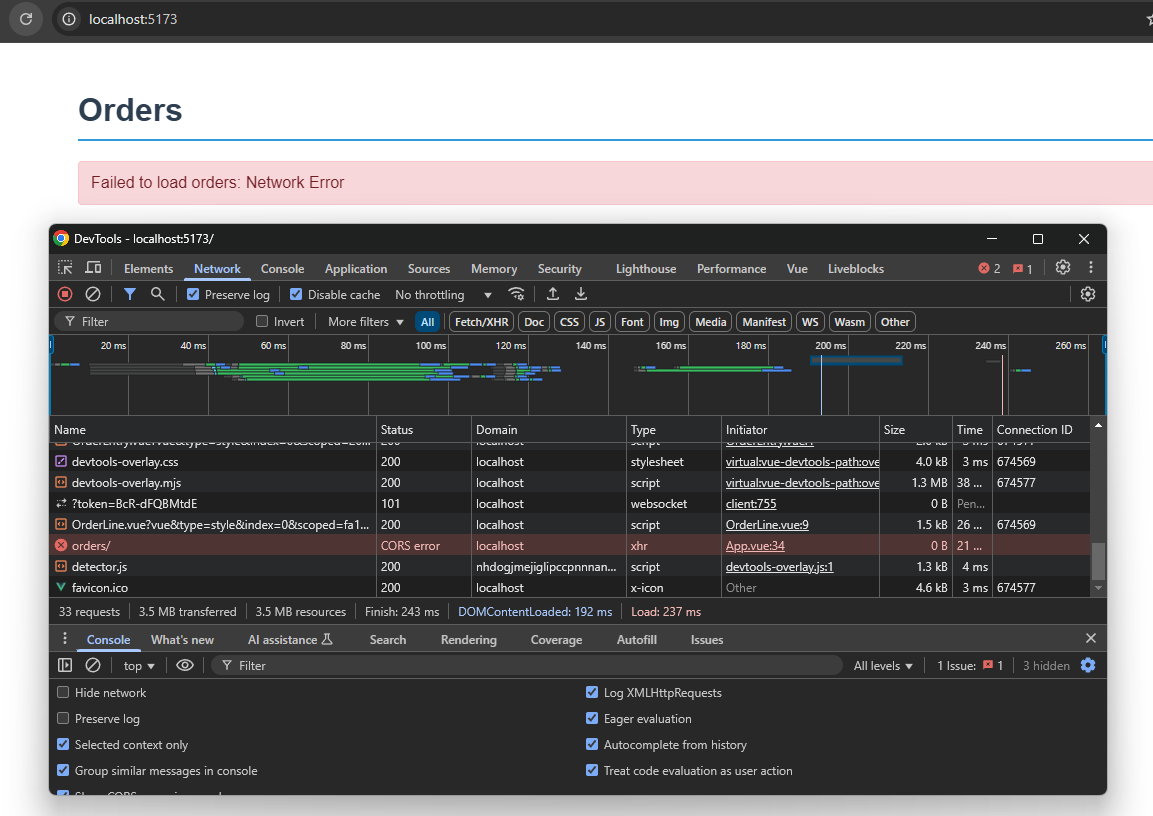
This is a security restriction in the browser because the frontend and backend servers are on two different domains (IP:PORT). https://developer.mozilla.org/en-US/docs/Web/HTTP/CORS/Errors
We need to allow cross-origin access by adding the correct headers to the backend responses.
This can be done with a Django plugin: https://pypi.org/project/django-cors-headers/
Can you install django-cors-headers and make it work?
Add the dependency to requirements.txt
django-cors-headers==4.9.0
Install from requirements.txt
pip install -r requirements.txt
Configure django in project/settings.py
Add "corsheaders", to INSTALLED_APPS
Add "corsheaders.middleware.CorsMiddleware" as the first item in the MIDDLEWARE list
Add the following new options at the end of the file
CORS_ALLOWED_ORIGINS = [
    "http://localhost:5173",
]
CORS_ALLOW_CREDENTIALS = True
We can now refresh the frontend and see our orders
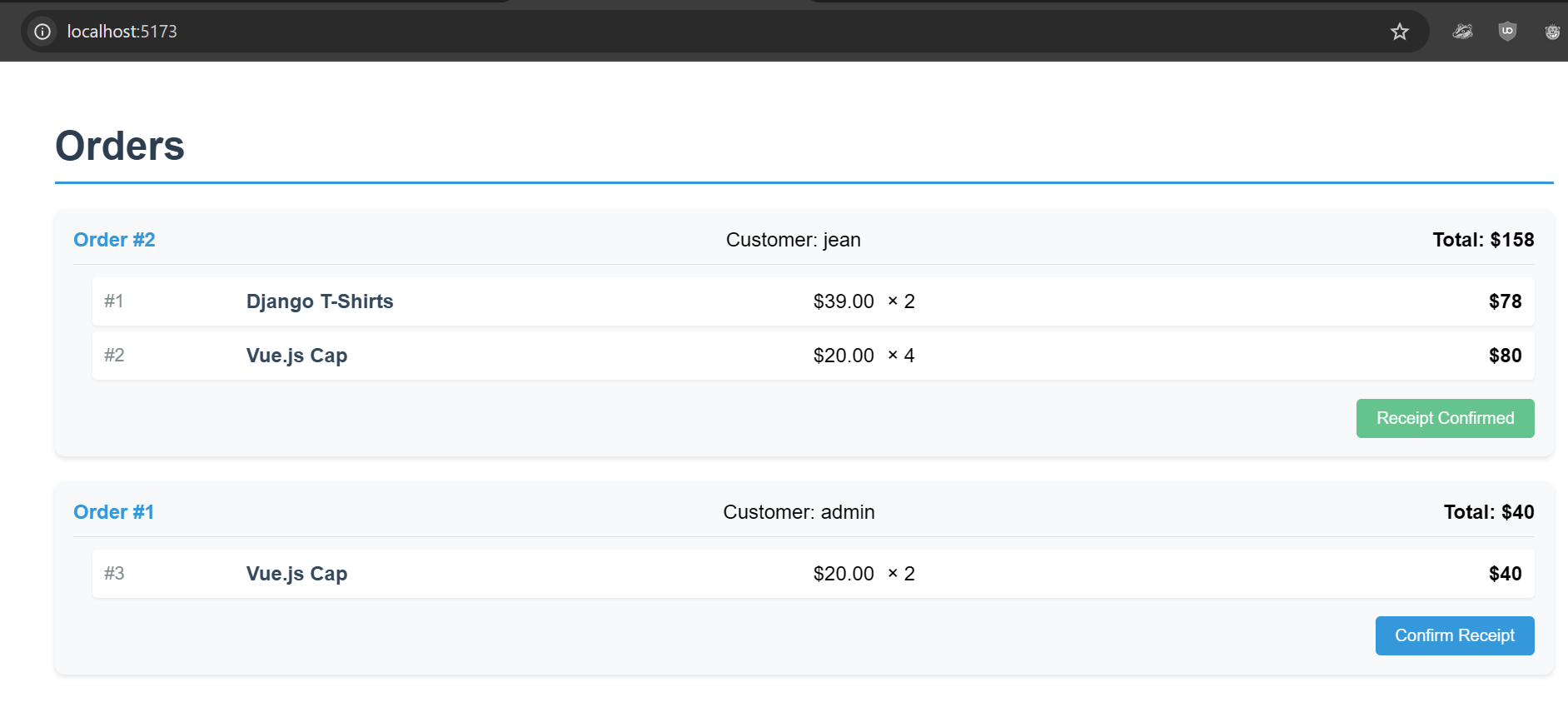
The Django ORM is like magic, and we have a nicely nested serializer. However, in its default configuration, it performs lazy fetching, which causes a problem: for each order, we end up making separate queries to retrieve OrderLines and then Products. As a result, each new order leads to multiple additional queries instead of executing fewer, optimized queries using SQL JOINs. We need to give some hints to the ORM to improve query efficiency.
With small datasets, this problem is not noticeable from a performance perspective. However, once we start dealing with real-world data—such as hundreds or thousands of rows—the page becomes increasingly slower due to the explosion of queries.
Let's add the Django Debug Toolbar to visualize the queries being generated for each page.
https://django-debug-toolbar.readthedocs.io/en/latest/installation.html
https://dev.to/herchila/how-to-avoid-n1-queries-in-django-tips-and-solutions-2ajo
Once installed, we can open it by clicking its logo on the right:

We can see that with our 2 orders we already have 15 queries...
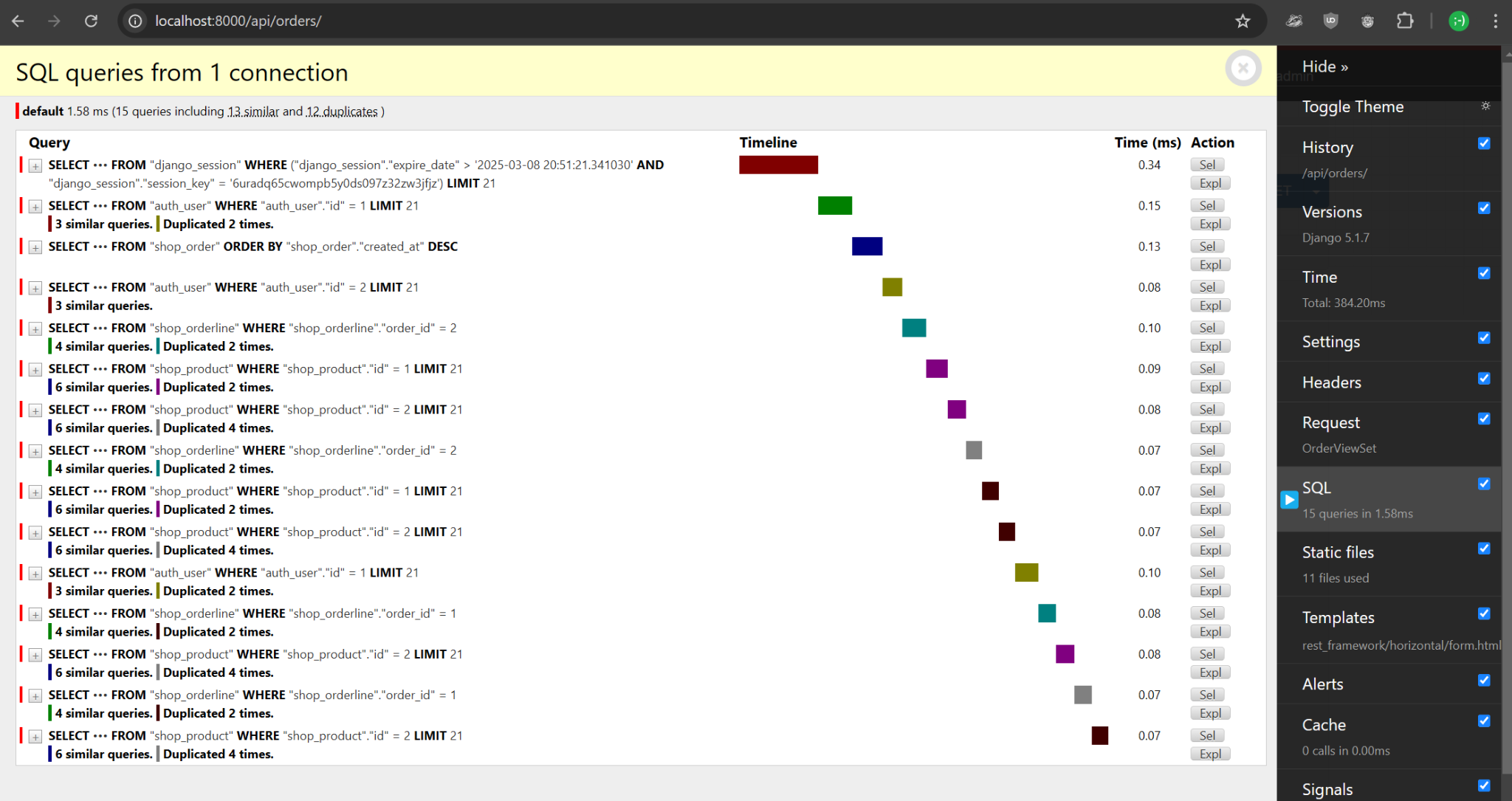
Can you install the Django Debug Toolbar and see the same thing?
Install the Django Debug Toolbar
Add to requirements and install
django-debug-toolbar==6.2.0
In the settings.py file:
Add the 'debug_toolbar' to INSTALLED_APPS
Afters corsheaders in MIDDLEWARE add
'debug_toolbar.middleware.DebugToolbarMiddleware',
Add to the end of the file
INTERNAL_IPS = [
    "127.0.0.1",
]
In urls.py
Import and add debug_toolbar_urls()
from debug_toolbar.toolbar import debug_toolbar_urls
urlpatterns = [
    path('admin/', admin.site.urls),
    path('api/', include(router.urls)),
] + debug_toolbar_urls()
Can you find ways to reduce the number of queries?
In addition to eager fetching some relationships, we also have this total computed field on the Order model.
return sum([line.total for line in self.orderlines.all()])This will run a query each time the method is called. Caching helps a little, but we could perform the computation directly in the SQL query.
Django uses QuerySets everywhere. We can override them in many places, but if we want to do it globally for both the admin and API, the best place is in the models. We achieve this by creating a custom ModelManager to replace the default .objects.
https://docs.djangoproject.com/en/5.1/topics/db/managers/
In shop/models.py add
class OrderManager(models.Manager):
    def get_queryset(self):
        return super().get_queryset().select_related('customer').prefetch_related(
            Prefetch(
                'orderlines',
                queryset=OrderLine.objects.select_related('product')
            )
        ).annotate(
            total_price=Coalesce(
                Sum(F('orderlines__quantity') * F('orderlines__product__price')),
                0,
                output_field=DecimalField()
            )
        )
Edit class Order, add the objects manager and replace the total method
class Order(models.Model):
    objects = OrderManager()
    ...
    @cached_property
    def total(self):
        """
        Return the total cost of the order.
        This uses the annotated total_price if available,
        avoiding any additional database queries.
        Used in both admin and API serializers.
        """
        if hasattr(self, 'total_price'):
            return self.total_price

        # Fallback to database aggregation if not annotated
        result = self.orderlines.aggregate(
            total=Sum(F('quantity') * F('product__price'))
        )
        return result['total'] or 0
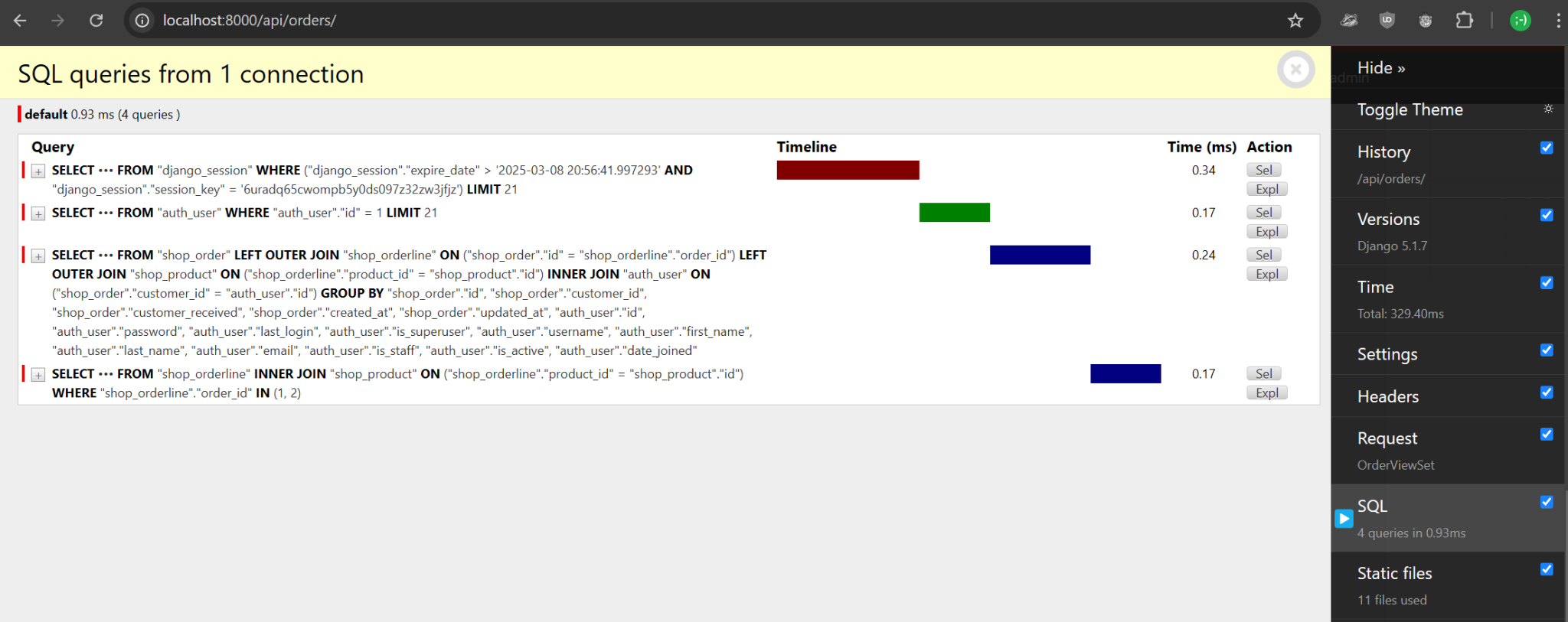
If we now refresh, we can see that we only have 4 queries (2 related to our data)
Currently, our REST APIs use the default permissions class of rest_framework.permissions.IsAuthenticatedOrReadOnly
We want to better secure our apis so that:
- Only superusers can edit products, but anyone can read them.
- Only superusers can view all orders; otherwise, each user can only see the orders for which they are the customer.
https://www.django-rest-framework.org/api-guide/permissions/#api-reference
https://www.django-rest-framework.org/api-guide/permissions/#custom-permissions
https://www.django-rest-framework.org/api-guide/filtering/#filtering-against-the-current-user
User login
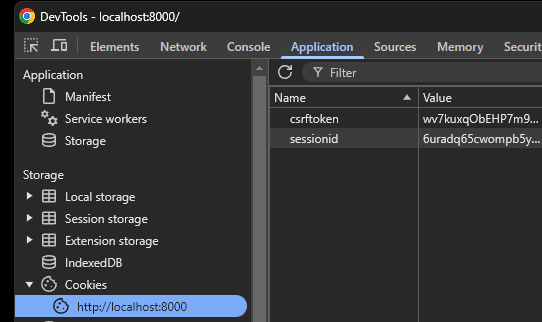
For this project, we will skip implementing an authentication/login page and use the default Django Admin login at /admin/. This will set a cookie in the browser, which will also work for the rest of the application.
Because we set:
"DEFAULT_AUTHENTICATION_CLASSES": (
    "rest_framework.authentication.SessionAuthentication",
),
https://docs.djangoproject.com/en/6.0/ref/settings/#std-setting-SESSION_COOKIE_NAME
Can you implement these permissions?
Products API
We will define our custom permissions in api.py
class IsSuperAdminOrReadOnly(permissions.BasePermission):
    """
    Custom permission to only allow superadmins to edit products
    """
    def has_permission(self, request, view):
        # Read permissions are allowed to any request
        if request.method in permissions.SAFE_METHODS:
            return True
        # Write permissions are only allowed to superadmins
        return request.user and request.user.is_superuser
We can use it on the ProductSerializer
By adding permission_classes = [IsSuperAdminOrReadOnly]
Orders API
To filter the OrderSerializer we only require to switch permission class and override the queryset
By adding
class OrderViewSet(viewsets.ModelViewSet):
    ...
    permission_classes = [permissions.IsAuthenticated]

    def get_queryset(self):
        """
        This view should return a list of all orders
        for the currently authenticated user, or all orders for superadmins.
        """
        if self.request.user.is_superuser:
            return models.Order.objects.all()
        return models.Order.objects.filter(customer=self.request.user)
Getting the order data on the client works great, but updating the order does not work because of a security protection mechanism in the Django framework.
https://docs.djangoproject.com/en/6.0/ref/settings/#std-setting-CSRF_TRUSTED_ORIGINS

To solve this, we need to configure certain settings on both the server and the client.
Fix the Server
In settings.py allow our frontend
CSRF_TRUSTED_ORIGINS = [
    "http://localhost:5173",
]
Fix the Frontend

https://docs.djangoproject.com/en/6.0/ref/settings/#csrf-header-name
https://docs.djangoproject.com/en/6.0/ref/settings/#csrf-cookie-name
We need to add to the axios parameters in OrderEntry.vue to tell it which cookie to read and which token header to use.
xsrfCookieName: "csrftoken",
xsrfHeaderName: "X-CSRFTOKEN",
withXSRFToken: trueCan you make your own level 2 Vue.js solution connect to your django-exercises backend?
Then, take a look at the provided sample application, and try running it to see how all the presented concepts are integrated into a single repository.
https://github.com/heg-interschool/template-django-vue
A simple Model of a message which can be edited only by an authenticated user
Includes:
- Django
- Django REST framework
- Django CORS Headers
- Login via django-allauth headless
- Vue 3 created with Vite
- Vue Router